 ProductPost 360
Blog
The sources a draft is allowed to use
Settings lock the product to one URL, then read the changelog, the blog, and the pages you choose. Drafts stay on that site until you add another product.
A draft is only as good as the pages it was allowed to read. Settings is where that boundary is drawn: one product URL, the people you are writing for, the voice, and the three places new sources can come from. Change those, and the posts queue changes with them. Leave them sloppy, and every draft inherits the sloppiness.
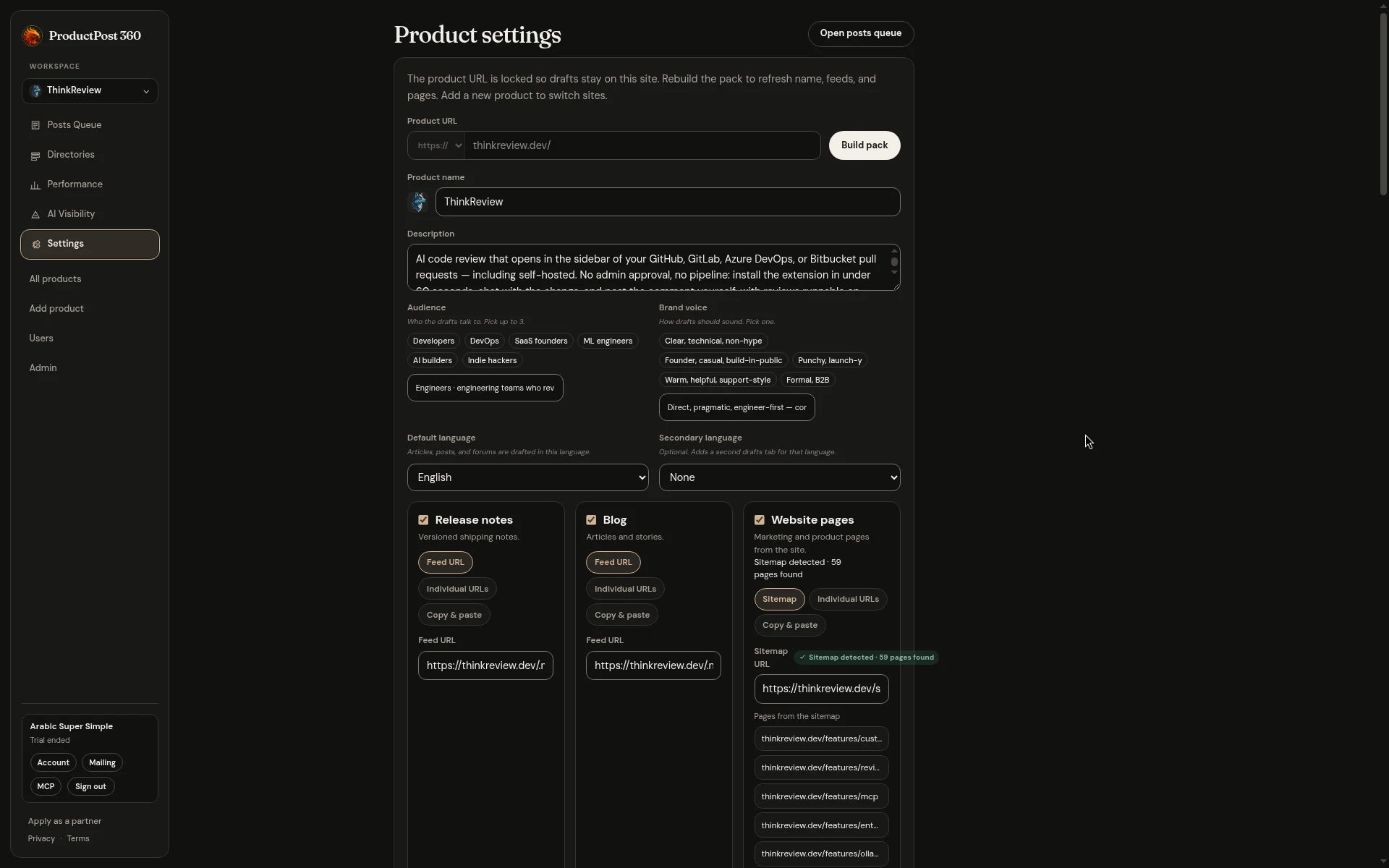
The screen is ThinkReview’s. The same form is what you get after you paste a URL and build the pack.
The URL stays put
The product URL is locked once drafts exist, so every draft stays about this site. Rebuilding the pack refreshes the name and the feeds from that URL. It does not quietly retarget the workspace at a different product. A second site is a second product, with its own queue, its own channels, and its own search property.
That lock is what keeps a busy week honest. You can have a marketing site and a docs site. They should be two products if you intend to post about both. One workspace aimed at whichever URL you edited last will mix their changelogs, and the drafts will sound like neither.
Who it is for, and how it should sound
Audience is up to three. ThinkReview’s are developers, DevOps, and SaaS founders. A draft for those people can mention a pull request and a self-hosted install. A draft for restaurant owners should not, and it will, if you leave “developers” selected on a product that is a reservation book.
Brand voice is one choice. Clear and technical. Warm and plain. Direct. Pick the one you would actually send. A voice chip you do not recognize in your own writing will show up as a paragraph you delete every time, which means the chip is wrong.
Language follows the same idea. Drafts are written in the default language. A secondary language is there for readers who need that version. Set it when you will really post in both. An unused second language is another pile of drafts.
Three ways a source gets in
Under the voice, three cards match the three tabs on the posts queue.
- Release notes. A feed URL, a list of individual URLs, or text you paste. A changelog that already has an RSS feed should be the feed. The queue then notices a new version on its own.
- Blog. The same three options. An Atom or RSS feed is the one that keeps the queue current. Paste is for the essay that lives nowhere else yet.
- Website pages. A sitemap, individual URLs, or a paste. ThinkReview’s sitemap reported dozens of pages. That number is how many URLs were found. Generate drafts for the few a stranger should read.
Use the cards by the shape of the company:
- You ship from a changelog and almost never blog. Turn release notes on. Leave the blog card empty until there is a feed worth reading.
- The blog is the product’s public record. Point the blog card at the feed, and let release notes wait until a version is a story.
- The site is a handful of marketing pages. Pick the homepage, pricing, and the one feature page a stranger should read. A sitemap that includes the legal pages and every integration will fill the pages tab with rows you will never open.
Edit in settings when a feed URL changes. The queue labels the saved source on each tab, so you can see which feed a row came from before you generate anything. Build pack when you want the name, the description, and the detected feeds refreshed from the locked URL. Then go back to the queue and open one source.