 ProductPost 360
Blog
What happened after the click
Analytics shows who arrived, which channel sent them, and which referrer they came from. Search Console never sees that half of the visit.

Search Console knows the query. It does not know whether the person stayed, or whether they arrived from a forum, a chat, or your own laptop. Analytics is that half of the story: users, sessions, views, engagement, and the sites that referred them, over the same 28 days, compared with the 28 before.
On Performance it sits under the brief, next to Search Console, Bing, and backlinks. The shots are ThinkReview’s GA4 property. Yours will name different hosts. The questions are the same.
Read the channel, then the URL
The daily chart is users, sessions, or views. The tables under it are where the time goes.
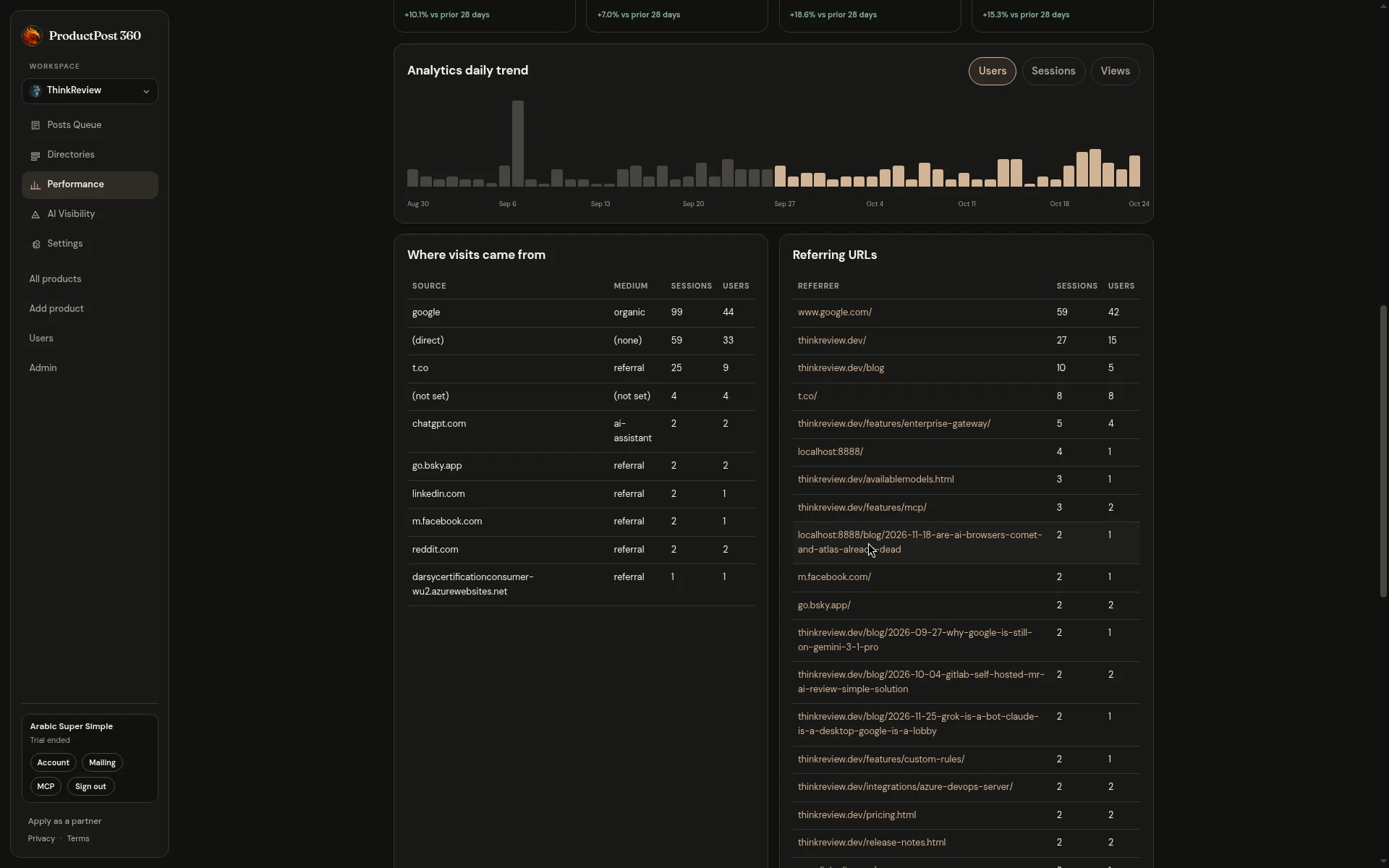
ThinkReview’s latest window is a useful mix to learn from, because it is ordinary:
- Google, organic, is the largest source. That lines up with a Search Console property that has real impressions. If organic is large here and Search Console is quiet, the property is the wrong one, or the dates do not overlap.
- Direct is the second pile: typed URLs, bookmarks, and anything analytics could not attribute. A big direct number is a reason to look at the referrer list, where some of those visits turn out to be your own site linking to itself.
- A referral from a short-link host, such as t.co, is social traffic with the campaign stripped off. It tells you X sent people. It does not tell you which post.
- An AI assistant source, such as chatgpt.com, is a visit that started in a chat. It is a small count on purpose. Treat a handful of those sessions as a signal that answers are sending people, and go read AI Visibility for the prompts. The session count will stay smaller than organic for a long time.
- Reddit, LinkedIn, and a product directory each show up as a couple of sessions. That is the score for a room, once the posts have had time to sit.
Two sessions can be the room
Founders skip the bottom of the referrer table because the numbers look embarrassing next to Google. The bottom is often the only place a community shows up.
A referrer with two sessions and an engagement rate that holds is a room to keep. A referrer with a burst of sessions and an engagement rate near zero is a spike, and the next draft can wait. The posts queue is where you act on that: open the source those people would recognize, and draft the room that sent them.
Your own blog will refer to your own posts. Those rows are navigation. They are worth a glance when a single article is sending people into the product, and they are easy to mistake for a new audience. The hostname tells you which is which.
Your laptop is in the table
Localhost, a preview URL, and a machine on your own network will show up as soon as you test the site while logged into the same analytics property. ThinkReview’s table includes a localhost referrer. The weekly brief calls that out as a recommendation: filter it, so developer traffic stops inflating users and sessions.
Do that in analytics, at the property, and the next refresh will show the visitors. Until then, read the table with that row in mind. A week that “grew” because three of you were clicking through a local build is a week you should not celebrate in a changelog.
When to open this page
Open it when you want to know whether a post, a listing, or a launch board did anything after the click. Give it the same 28-day window as Search Console, so the two reports can be read together. A query with impressions and a referrer with engaged sessions are different wins. One says Google showed the page. The other says a specific site sent a person who stayed.
Connect the property once. After access is saved, refresh does not ask you to sign in again. The numbers on the posts queue are this same window, shortened to four figures, so you can see the shape before you generate a draft.