 ProductPost 360
Blog
A link is not a visit
Backlinks record the crawl that found a link, the anchor, and whether it is new. A visit only shows up if that page also sent someone.
A backlink is a page that points at you. A visit is a person who arrived. Both can be true on the same day, and either one can show up alone. Performance keeps them in different sections so a flattering link graph cannot stand in for an audience.
The backlink panel on Performance is the crawl’s view: how many links, how many referring domains, which pages, the anchor, and the day the crawl first saw the link. The screens are ThinkReview’s. Those dates come from the crawl, which changes how you read a row marked new.
First seen is the crawl
First seen is the day the crawl discovered the link. A post from March can appear as new in November, because that is when it entered this index.
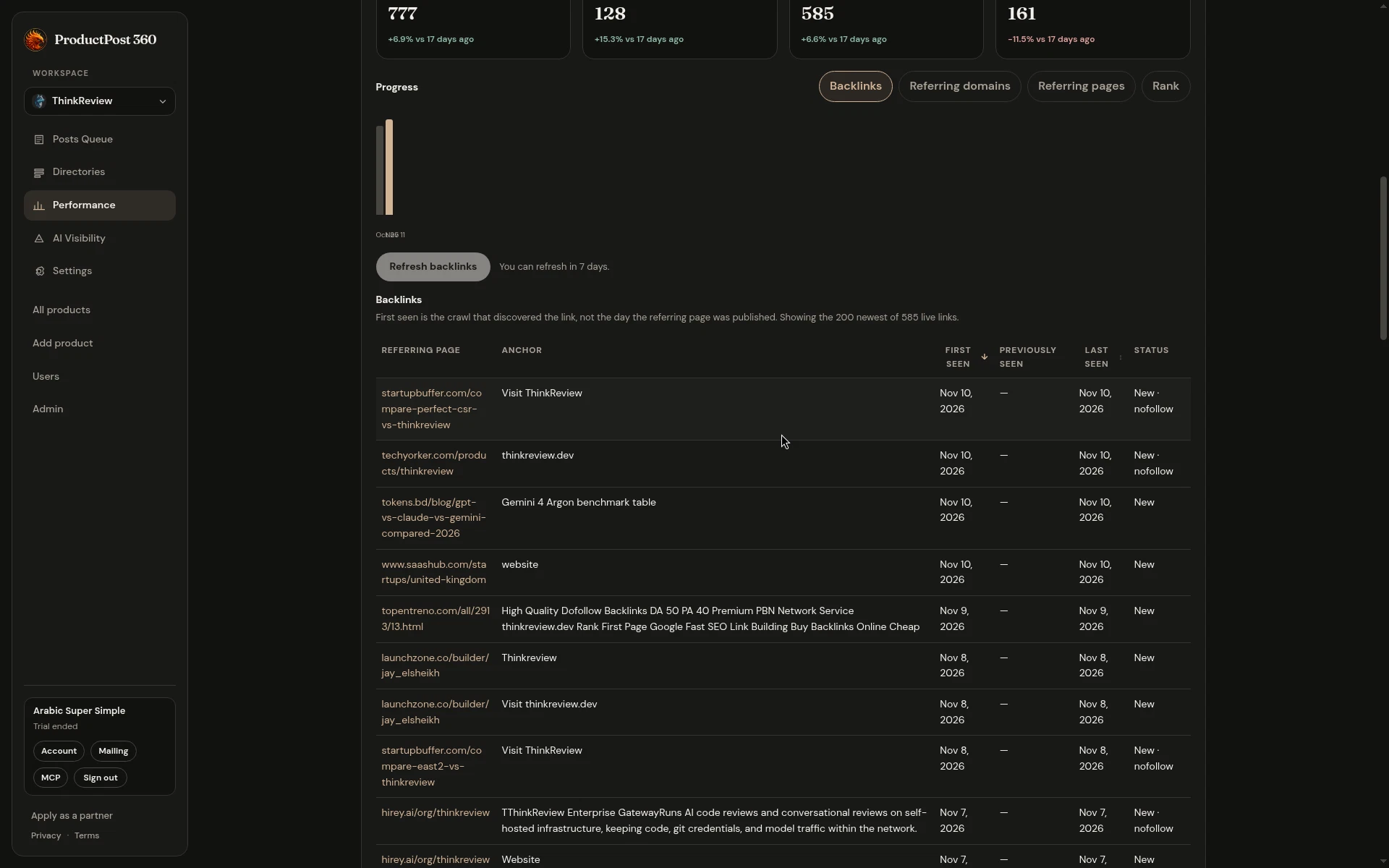
The table is sorted with the newest discoveries first, and a refresh is available about every 7 days. Read a “new” row as “new to this crawl,” then open the referring page if the anchor looks like a real mention.
ThinkReview’s newest rows are a mix you will recognize on any small product:
- A blog comparison that uses the product name, or a benchmark, as the anchor. That is a mention a buyer might read. Open it. If the page is fair and the description is stale, a short note to the author is a reasonable next step. The link itself is already the win.
- A roundup or a builder directory that says “Visit” and points at the product. Useful, usually nofollow, and still a place your name appears. Nofollow is a label. It does not erase the page.
- A page whose anchor is a sales pitch for buying links. Those show up on almost every crawl once a domain is old enough. They are not a partnership. Leave them, and do not “disavow” your way into a project.
Referring domains and referring pages are the other two tabs. Domains answer “who.” Pages answer “which URL.” Rank is there when the crawl has it. None of those tabs are sessions. If you want to know whether the domain sent anyone, that number is in Analytics, often as a zero.
Broken links are a fix on your site
The weekly brief reads this same snapshot. When it says the profile lists broken backlinks, it means other sites point at URLs of yours that no longer resolve. The fix is on your side: a redirect to the page that replaced them, so the mention keeps its destination.
That job is different from chasing new links. A broken mention is an audience you already earned, aimed at a 404. A new nofollow from a comparison post is a page you might want to read. A spam anchor is neither.
What to do on the day the count moves
The totals at the top move slowly: links, referring domains, and how that changed since the prior check. A jump of a few dozen links in a week is often one site adding a lot of URLs, or the crawl catching up. Open the new rows before you tell yourself the graph improved.
A calm week looks like this:
- Skim the new anchors. Keep the ones a person wrote. Ignore the ones selling a service.
- If a real page described the product wrongly, reply there, as yourself.
- If several good links point at a dead URL, add the redirect.
- Check Analytics for that referring host. A link with no sessions is still a link. It is a weak reason to write five more posts “for SEO” this afternoon.
The posts you paste can become these rows later, after someone else’s site cites them. The backlink table will not move on the day you paste. Give the crawl the same patience you give Search Console, and judge the room by the referrer list when you want to know who actually came.